It cannot create consent
A technically accurate transcript does not prove that every speaker agreed to recording, processing, or publication.
Workaround
Document consent before recording and keep the consent record with the source file.
Practical voice workflows
These openai whisper examples show how teams can move from a raw recording to searchable, reviewable text. See the workflow, inspect a realistic output, and adapt the process to your own audio.
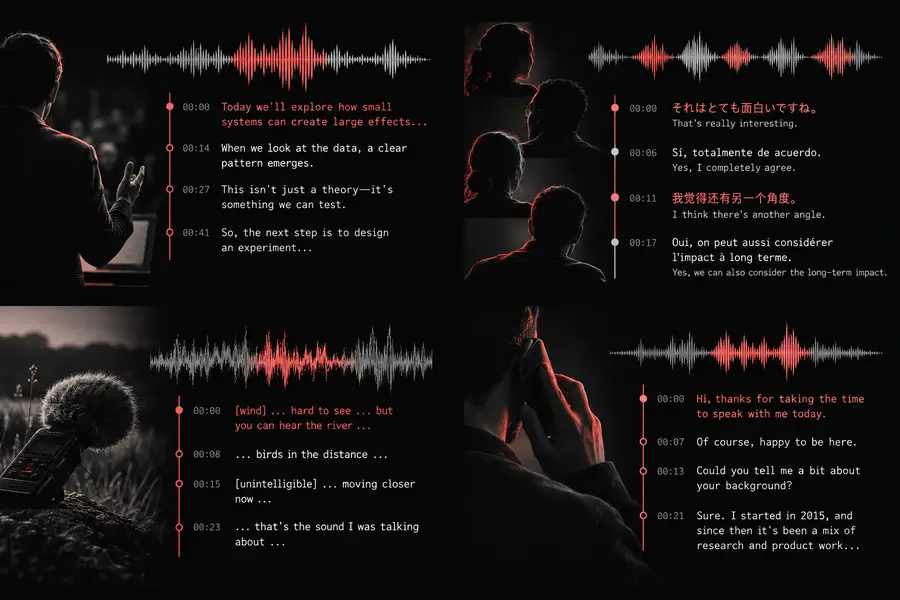
The most useful Whisper examples are repeatable: capture the audio, transcribe it, then apply a human review step before the text becomes a business record.
Record an interview, meeting, support call, or field note in a stable format. Keep the original file so the transcript can be checked against the source.
Send the recording through a Whisper workflow, then preserve timestamps, language information, and speaker labels when the use case needs them.
Correct names, numbers, jargon, and sensitive passages. Export the approved text into notes, captions, a research archive, or an internal knowledge base.
A useful result is more than a wall of text. For a customer interview, the output might retain timestamps and speaker turns so a reviewer can quickly verify the important claims.
Whisper can help process audio, but it does not decide whether your recording was collected or shared lawfully. Treat transcription as one step in a governed workflow.
A technically accurate transcript does not prove that every speaker agreed to recording, processing, or publication.
Workaround
Document consent before recording and keep the consent record with the source file.
Unusual names, overlapping speech, accents, crosstalk, and specialist vocabulary may produce plausible but incorrect text.
Workaround
Require a human review for names, figures, quotations, medical terms, legal language, and customer commitments.
A transcript may expose addresses, account details, health information, or confidential business discussions in a more searchable form.
Workaround
Apply redaction or access controls before placing the output in shared storage or downstream systems.
Keeping both the recording and transcript indefinitely can increase exposure and make deletion requests harder to fulfill.
Workaround
Set a retention period for each format, restrict access, and delete files when the approved purpose ends.
Primary form
Raw recording
Compressed or uncompressed audio with natural pauses and background sound
Reviewed Whisper output
Searchable text organized by timestamp, speaker, or paragraph
Human effort
Raw recording
Someone must listen through the recording to find a quote or decision
Reviewed Whisper output
A reviewer checks the generated text instead of starting from a blank page
Searchability
Raw recording
Limited to file name, folder, and manually added metadata
Reviewed Whisper output
Words, phrases, topics, and time ranges can be indexed
Accuracy risk
Raw recording
Meaning is heard directly, but retrieval is slow and inconsistent
Reviewed Whisper output
Text can contain errors, especially with overlap, jargon, accents, and names
Best use
Raw recording
Source of truth for verification and reprocessing
Reviewed Whisper output
Notes, captions, research coding, summaries, and approved internal records
Governance
Raw recording
Access depends on who can play the file
Reviewed Whisper output
Text needs its own permissions, redaction, retention, and audit rules
Recommended next step
Raw recording
Preserve the original and record its context
Reviewed Whisper output
Review critical passages, then publish or export only the approved version
Start with one repeatable workflow: transcribe a conversation, verify the important passages, and turn the approved result into notes or searchable text. The same pattern scales from a single interview to a larger audio archive.
Try a transcription workflowAnswers to common questions about using Whisper examples in real audio workflows.
Common use cases include meeting notes, interview transcription, captions, support-call review, research coding, and searchable voice archives. The strongest workflows pair automatic transcription with a review step for important or sensitive content.
Whisper itself produces speech recognition, but speaker identification or diarization is usually handled by an additional process. If speaker attribution matters, verify each label against the recording before sharing the transcript.
They can provide a strong first draft, but accuracy varies with audio quality, accents, overlap, jargon, and proper names. A human should review quotations, figures, legal or medical language, and any passage that could change meaning.
Use the clearest source available, with limited background noise and minimal overlapping speech. Keeping the original recording, its language context, and useful timestamps makes errors easier to investigate and correct.
Only after checking your processing environment, access controls, consent requirements, and retention policy. A transcript can make confidential information easier to search, so apply the same or stronger safeguards used for the original recording.